Features Getting Started
Getting Started
Install the extension, set up your menu, and choose your options.
1. Install
Add Podio Super Menu from the Chrome Web Store, then reload any open Podio tabs.
2. Set up your menu
Sign in with Podio, then pick your workspaces and apps on the Menu page and your number keys on the Shortcuts page. In Podio, click the logo and then Update.
3. Choose your options
Click the Super Menu icon in Chrome's toolbar to switch features on or off. Reload Podio after changing them.
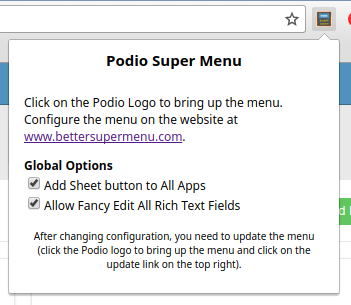
| Option | What it does |
|---|---|
| Add Sheet button | Shows the Sheet button on app views |
| Expand App descriptions | Opens app descriptions and shows pinned reports |
| Allow Fancy Edit Rich Text Fields | Shows Edit with SuperMenu on text fields |
| Show My Avatar in Top Bar | Shows your photo in Podio's top bar |
| Make new Teal UI nicer | Restyles parts of Podio's newer interface |
| Live Update Widgets | Dashboard widgets refresh every minute without a page reload |
| Remove animated Gliphies | Turns animated images in comments into links |
| Show Dig Link | Shows the Dig link on app views |
Try it in your Podio
Free Chrome extension. Takes a minute to set up.
More highlights
Super MenuEvery workspace and app, one click awayShortcut KeysYour top apps on keys 1 to 9Spreadsheet EditingEdit any Podio view as a spreadsheetRich Text EditorA better editor for text fieldsSilent EditsBulk changes without the noiseApp Sidebar & ReportsApp descriptions that stay open, with live reports